

Customize Real Football RF Points
Choose your RF Points balance and spend it on the bonus content you want.
Requires the Windows app and the Bytonian Mods browser extension for Chrome or Edge. Browser setup guide

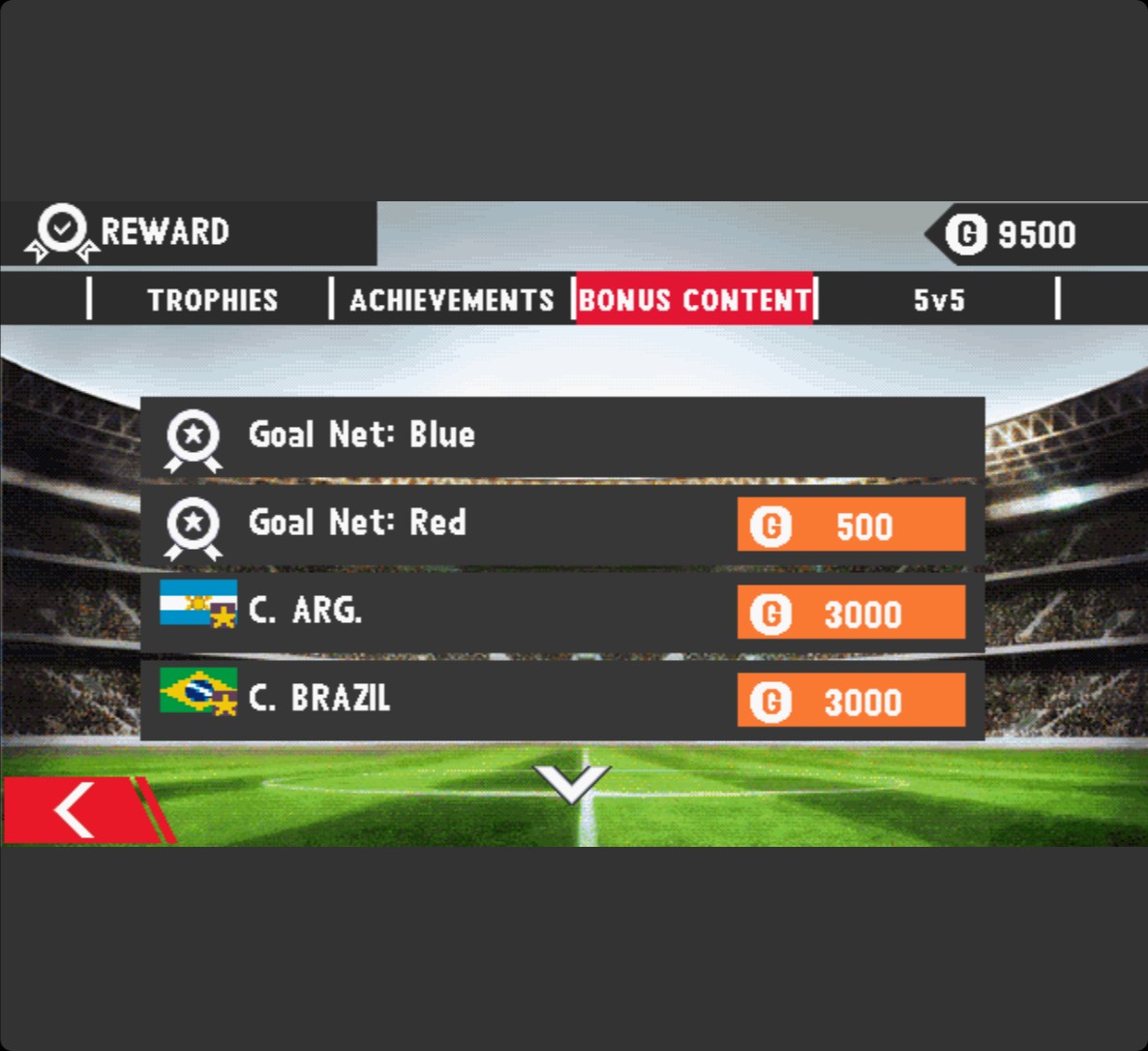
Buy bonus content with RF Points
After buying the blue goal net for 500 RF Points, the Bonus Content shop shows 9,500 points remaining.
How to use RF Points
Set a balance and apply your change. Once Real Football reopens, select Reward and open Bonus Content. Choose an item and confirm its purchase.
Keep choosing your own unlocks
The control changes your points balance. You still choose which goal nets and classic teams to buy in the shop.
Available customisation options
RF PointsFree
Set RF Points to buy goal-net colors and classic teams in Bonus Content.
Apply your chosen balance, then open Reward and Bonus Content to make your purchases.
Questions about customisation options
- Is the RF Points control free?
- Yes. You can set RF Points without a premium membership.
- Does setting points also buy items?
- No. Open Bonus Content and buy each item you want using its normal purchase button.
Using these features
Connect your game, then open Customise in the Windows app. Choose an option, check its available values and follow its instructions. Each option lists its own requirements and limits.
Setup for Real Football →