
Coins for new color themes
Choose a coin balance to spend on cosmetic themes. The Store shows each palette's price and equips a newly purchased theme.
Requires the Windows app and the Bytonian Mods browser extension for Chrome or Edge. Browser setup guide
Keep coins ready for theme purchases
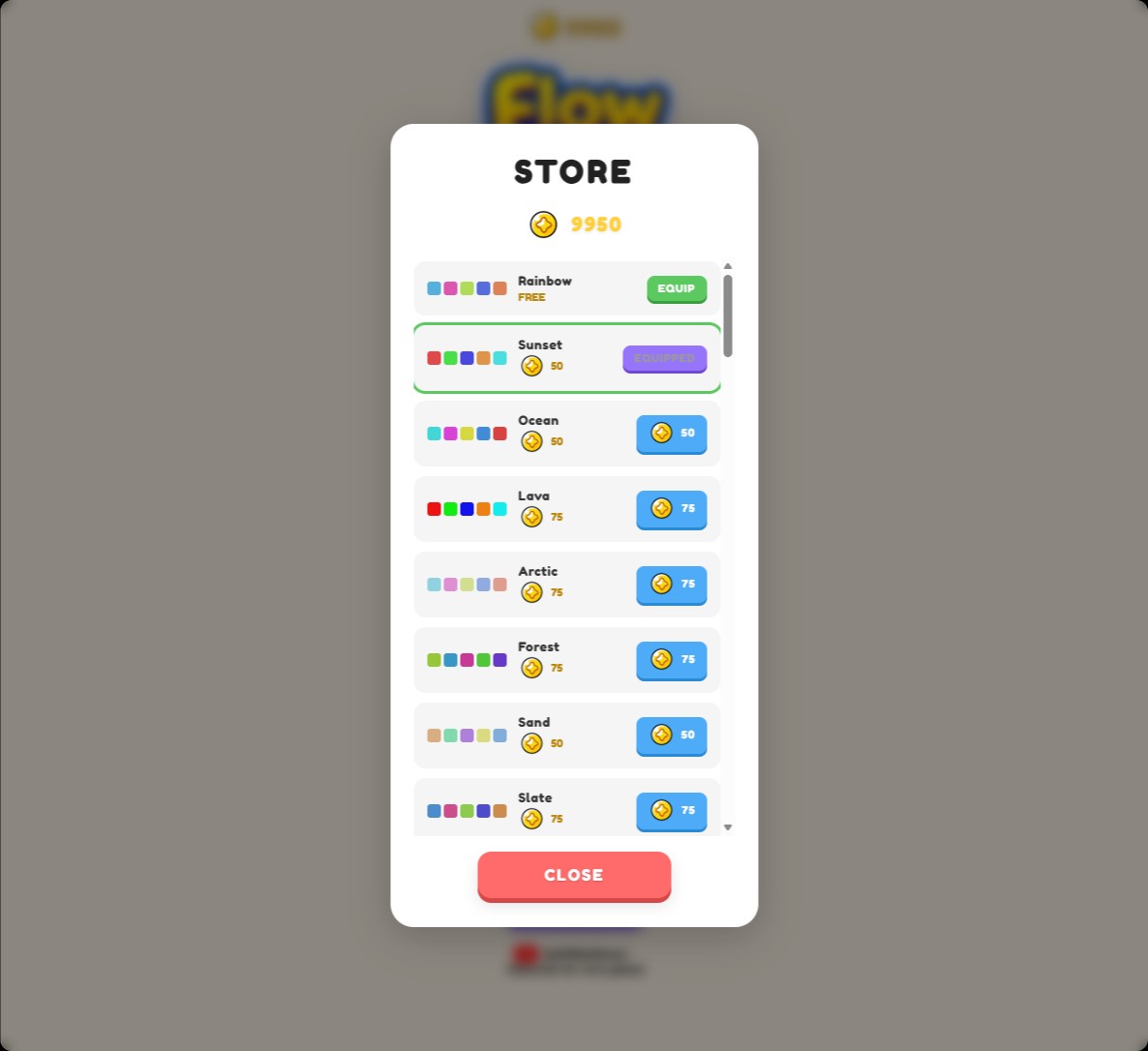
Buy color themes from the Store and equip a new palette. Sunset is equipped here, with 9,950 coins left after its 50-coin purchase.
Buy and equip a palette
Open the shopping cart on the main menu, choose a theme and press its coin-price button. Sunset costs 50 coins; after purchase, its row shows Equipped. You can return to an owned theme with Equip.
Available customisation options
CoinsFree
Choose your coin balance for color theme purchases.
Open the Store from the main menu, buy a palette and equip it.
Using these features
Connect your game, then open Customise in the Windows app. Choose an option, check its available values and follow its instructions. Each option lists its own requirements and limits.
Setup for Flow Line Puzzles →